Live Contest Scheduler - BETA
Real-time multi-operator scheduling for contest weekends; built for the shack, not the spreadsheet. Running a Multi-Op or Multi-Transmitter contest means coordinating a team of operators across multiple stations and bands. The Live Contest Scheduler replaces the whiteboard, the group chat, and the shared Google doc with a single live tool every operator on your team can see - and interact with - in real time.
This may also be useful for distributed multi operations, like W1AW/x or the 13 Colony Special Event. Feel free to use it for whatever purpose you see fit.
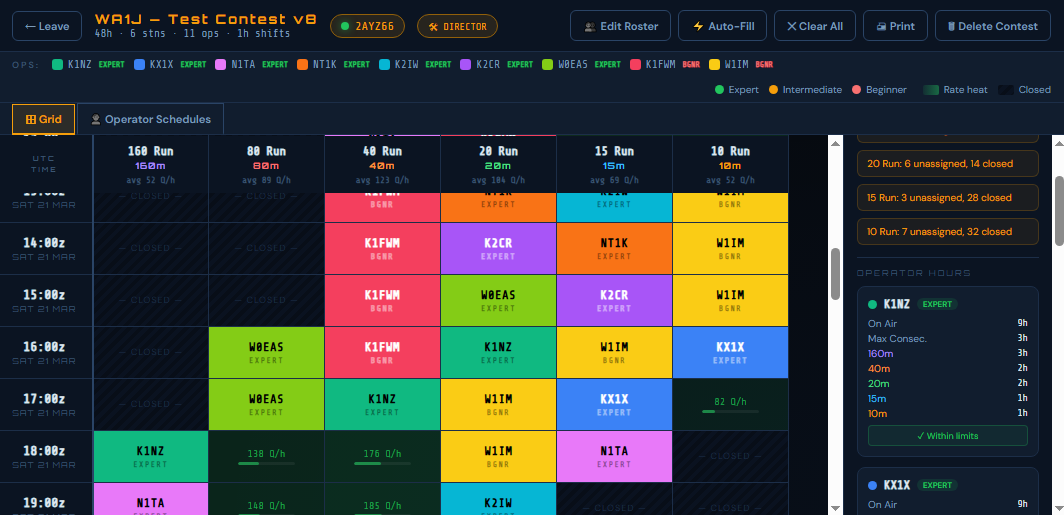
The director (that's you) sets up the contest once: enter the contest name and callsign, pick your start time in UTC, configure your stations and their bands, add your operators with their skill levels, and set your scheduling rules. The app generates a schedule grid - time runs down the left axis in UTC, stations run across the top - and you're ready to go. From there, operators join by visiting the link you send them on their phone or laptop, and log-in with their call sign. No accounts, no passwords. They see the same live grid you do. When they want a shift, they tap the cell to claim it. When they don't want a shift, they tap to release it. Every change appears on every screen within seconds.
Live collaboration. Changes made by the director or any operator are broadcast to all connected clients instantly over a real-time WebSocket connection. The colored dot next to the contest code tells you your connection status at a glance.
Skill-aware auto-fill. Tag each operator as Expert, Intermediate, or Beginner. Hit Auto-Fill and the scheduler assigns operators to shifts automatically - Experts go to the highest-rate slots first, Beginners cover the quiet hours. Fairness balancing ensures no one operator hogs the prime time.
Band rate model. Every empty cell shows an estimated Q/h rate and a heat bar based on a built-in propagation model calibrated to competitive M/M contest logs, with adjustments for solar conditions. High-solar runs? Low-solar nights? Set it in setup and the heatmap shifts accordingly.
Rate goals. Separately from the propagation model, the director can enter target Q/h goals by band and UTC hour; this is useful for setting team expectations or importing your own historical log data via CSV.
Dead-band threshold. Set a minimum Q/h below which a band is considered effectively closed. Those cells are automatically marked CLOSED and shown with a distinctive stripe pattern. Operators can still claim them if they want to monitor the band, but they'll see a warning first.
Max consecutive shifts & minimum rest. Tell the scheduler how many back-to-back shifts are allowed and how many rest shifts are required between blocks. Auto-fill respects these limits automatically. The director can override them manually at any time.
Operator schedules view. Switch to the Operator Schedules tab for a personal timeline view - one card per operator showing exactly when they're on, what station, and what band, hour by hour across the whole contest.
Printable. The Print button opens a clean, landscape-formatted version of whichever view you're on - grid or operator schedules - and triggers the browser print dialog automatically.
Automatic data deletion. All contest data is permanently deleted five days after the contest ends. No cleanup required.
I don't offer any guarantee related to this free application. If you are having trouble, email me and I will probably attempt to help you. I can make the source code available if you want to make your own version of this. I will also make (very, very) occasional updates; please feel free to make suggestions for improvement.
 Mike DeChristopher, N1TA
 Return Home